Rolling Sum
Math · Rolling
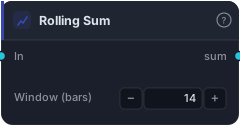
Sum of the trailing N bars — a windowed total (distinct from Cumulative Sum, which runs from the first bar). Useful for counting/adding over a fixed lookback.
Rolling Sum adds up the last N bars of a series — a windowed total that slides forward one bar at a time. Unlike a running total that grows forever, this one only ever holds the most recent N bars, so it's the right tool for "how much over the last N bars" questions.
How it works
Each bar the block sums the trailing window values (current bar plus the N−1 before). As a new bar arrives it's added and the oldest bar drops off, so the window stays fixed-width. The first window − 1 bars are NaN until the window fills. It's lookahead-free.
When to use it
Use it to accumulate anything over a fixed lookback: total volume over N bars, the count of true events (feed it a 1/0 series), or a windowed net change. It's distinct from Cumulative Sum, which runs from the very first bar and never forgets — reach for Rolling Sum when you want a recent total, not an all-time one.
Example
Volume surge filter: wire bar volume into Rolling Sum (window = 20) to get 20-bar total volume, and into a second Rolling Sum of the prior period, then compare the two with GreaterThan to only trade when recent participation is expanding.
Tips & gotchas
- Windowed, not cumulative — use Cumulative Sum for an all-time running total.
- Sum of a 1/0 signal = a count — how many of the last N bars were true (see also Rolling Count True).
- First
window − 1bars are NaN.
Related blocks
Inputs
| Socket | Type | What to wire in |
|---|---|---|
| In | series / bars |
Source series. BARS input uses close. |
Outputs
| Output | Type | Plots as | Description |
|---|---|---|---|
| sum | series |
Line · sub-pane | Per-bar rolling sum. |
Parameters
| Parameter | Type | Default | What it does |
|---|---|---|---|
| Window (bars) | number · 2–500 | 14 |
Bars in the rolling window. |
Reference auto-generated from the block catalog · category Math.