Volume Profile
Indicators · Volume
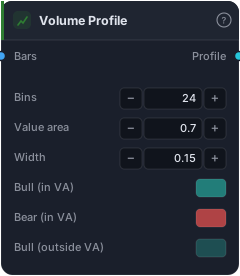
Horizontal volume histogram on the price axis (visible range).
Volume Profile flips volume on its side. Instead of asking "how much traded per bar (over time)?", it asks "how much traded at each price?" — and draws a horizontal histogram down the price axis showing where the most business got done. The fattest bars mark prices the market accepted and defended; the thin bars mark prices it rejected and rushed through. It's the map institutional traders use to find genuine support, resistance, and fair value.
How it works
Across the visible range the block splits price into Bins (default 24) and tallies how much volume traded in each price bucket, painting a horizontal bar per bucket. Three landmarks fall out of that distribution. The POC (Point of Control) — drawn as a dashed line — is the single price with the most volume, the session's "fairest" price and a magnet/pivot. The Value Area is the central band containing the Value area fraction of total volume (default 0.7 = 70%), bounded by the Value Area High and Low (VAH/VAL) — the zone where most trading happened. Up- and down-volume are coloured separately, and dimmed outside the Value Area. Width controls how much of the chart's pixel width the profile occupies (0.15 ≈ TradingView's default).
When to use it
Use Volume Profile to find high-probability levels. The POC and Value Area edges act as support/resistance far more reliably than arbitrary lines, because they mark where real volume changed hands. Classic plays: fade moves back toward the POC in a range; treat a break and acceptance outside the Value Area as a breakout; and watch low-volume nodes (the gaps in the profile) as prices the market moves through quickly — good breakout targets. It's a context and level tool, not a timing trigger.
Example
Trade a Value-Area edge: read the VAL (lower Value Area boundary) off the profile as a support zone, and when price taps it and a separate trigger fires (a bullish Crosses Above or an RSI turn), route into a Buy Signal targeting the POC. Use the area just below VAL for your Fixed Stop-Loss. Backtest in the Tester.
Tips & gotchas
- Volume by price, not by time — that's the whole paradigm shift.
- POC and Value-Area edges are premium levels — they beat arbitrary lines because real volume defends them.
- Low-volume nodes = fast zones. Price tends to slice through thin areas — useful as targets.
- Bins resolution is a trade-off — more bins = finer detail but noisier; fewer = cleaner but coarse.
- It's a level map, not a trigger — pair it with a timing signal.
Related blocks
Inputs
| Socket | Type | What to wire in |
|---|---|---|
| Bars | bars |
OHLCV bars — volume column required |
Outputs
| Output | Type | Plots as | Description |
|---|---|---|---|
| Profile | series |
Volume profile | Per-pane horizontal volume profile |
Parameters
| Parameter | Type | Default | What it does |
|---|---|---|---|
| Bins | number · 4–200 | 24 |
Number of price buckets |
| Value area | number · 0.1–0.99 | 0.7 |
Containment ratio for VAH/VAL (0.7 = 70% of total volume) |
| Width | number · 0.05–0.6 | 0.15 |
Fraction of the chart's horizontal pixel width the profile occupies. 0.15 matches TradingView's default. |
| Bull (in VA) | colour | rgba(38, 166, 154, 0.7) |
Up-volume colour for bars inside the Value Area |
| Bear (in VA) | colour | rgba(239, 83, 80, 0.7) |
Down-volume colour for bars inside the Value Area |
| Bull (outside VA) | colour | rgba(38, 166, 154, 0.35) |
Up-volume colour for bars outside the Value Area |
| Bear (outside VA) | colour | rgba(239, 83, 80, 0.35) |
Down-volume colour for bars outside the Value Area |
| POC line | colour | rgba(255, 167, 38, 0.95) |
Dashed horizontal line across the chart at POC price |
Reference auto-generated from the block catalog · category Indicators.