Higher Timeframe
Data · Multi-Timeframe
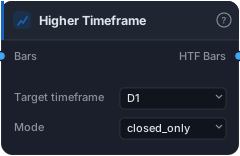
Resample bars to a higher timeframe. Output sits at the higher-TF cadence (one row per period). Wire the result through AlignToBars to use a higher-TF series in lower-TF signal logic without lookahead.
Higher Timeframe resamples your bars up to a larger timeframe — turning H1 bars into D1 bars, M15 into H4, and so on — right inside the graph. It's the foundation of multi-timeframe analysis: the discipline of taking your bias from a higher timeframe (where the dominant trend lives) and your entries from a lower one. With this block you can compute a daily moving average or weekly structure while still trading your H1 chart, all from a single Data Source.
How it works
Wire your lower-timeframe Bars in and pick a Target timeframe (which must be larger than the source). The block aggregates groups of source bars into higher-timeframe candles — each higher-TF open is the first child's open, the high/low are the extremes across the group, the close is the last child's close, and volume sums. The output sits at the higher-TF cadence: one row per completed period, not one per source bar — which is exactly why it needs Align to Bars before you can use it in lower-TF signals.
The Mode setting is a no-lookahead safety switch. closed_only (the default) drops the still-forming trailing bar — so at any moment you only ever see completed higher-TF candles, which is the honest choice for backtesting. live includes the in-progress partial bar; it's fine for live visualisation but would leak future information in a backtest, so leave it on closed_only unless you specifically know you want the live view.
When to use it
Use Higher Timeframe whenever your strategy should respect a bigger-picture trend or level: a daily EMA bias on H1 entries, weekly support/resistance, a higher-TF Market Structure read. The pattern is always the same three blocks — Higher Timeframe → indicator → Align to Bars — which resamples up, computes on the slow bars, then projects the result back onto your fast bars without cheating. Trying to use the resampled output directly in lower-TF logic won't line up; the align step is mandatory.
Example
A daily-trend filter on H1: take your <Primary> H1 Data Source, run its bars through Higher Timeframe set to D1 (closed_only), feed those daily bars into a 50-EMA, then pass the EMA through Align to Bars (target = the H1 bars) so every H1 bar knows the current daily-EMA value. Only take H1 longs while price is above it. Backtest in the Tester.
Tips & gotchas
closed_onlyfor backtests — always.liveincludes the partial bar and leaks the future; only use it for live charts.- Output is at the higher-TF cadence — one row per period. You must follow it with Align to Bars to use it in lower-TF signals.
- Target must be larger than the source — you can't resample H4 down to M15.
- Bias from above, entries from below — that's the whole point of multi-timeframe; don't enter on the slow signal directly.
Related blocks
Inputs
| Socket | Type | What to wire in |
|---|---|---|
| Bars | bars |
Source bars at the lower timeframe. |
Outputs
| Output | Type | Plots as | Description |
|---|---|---|---|
| HTF Bars | bars |
— | Resampled bars at the chosen higher timeframe. |
Parameters
| Parameter | Type | Default | What it does |
|---|---|---|---|
| Target timeframe | choice (M5, M15, M30, H1, H4, D1, W1, MN1) |
D1 |
The higher timeframe to resample to (must be larger than the source). |
| Mode | choice (closed_only, live) |
closed_only |
closed_only: drop the in-progress trailing bar — safe for backtests (no lookahead). live: include the partial current bar — only safe for live visualization. |
Reference auto-generated from the block catalog · category Data.