Data Source
Data
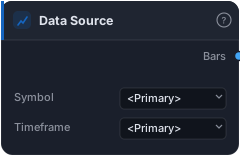
Price bars source — loads historical OHLCV from the local store. Use <Primary> on symbol or timeframe to follow the chart-header picker, or pin an explicit pair for multi-TF / multi-asset wiring.
The Data Source is the well every strategy drinks from — it pulls real historical OHLCV (open, high, low, close, volume) bars from the local store and hands them downstream as a Bars series. Every indicator, signal, and the Tester ultimately traces back to one of these. If a block needs prices, it needs a Data Source feeding it, directly or through the graph. It's the entry point of the entire system.
How it works
You choose two things: a Symbol and a Timeframe. The catalogue spans three asset classes from one store — forex (majors and crosses like EURUSD, GBPJPY, AUDCAD), US stocks & ETFs (AAPL, NVDA, TSLA, SPY, QQQ, the sector XLs…), and crypto (BTCUSD, ETHUSD, SOLUSD and many alts). Timeframes run from M1 through M5, M15, H1, H4, D1, W1, MN.
Both fields default to the magic value <Primary>, which means "follow whatever the chart header is showing." When the strategy runs, the executor injects the chart's current symbol and timeframe and the loader resolves <Primary> to those — so the same graph runs on EURUSD H1 or BTCUSD M15 without touching a single node. Pin an explicit ticker or timeframe instead and that loader stays locked to it, which is how you build multi-asset logic in one graph.
Under the hood it delegates to the active data provider (a TimescaleDB hypertable plus continuous aggregates), reading whatever history is on disk for that (symbol, timeframe) pair. There's deliberately no "number of bars" parameter — backtests read full history (or just the date-ranged window via a bounded query), the chart preview reads a recent window, and the optimiser caps its own sweeps. The loader also tags the bars with their instrument so the Tester applies the correct spread, pip value, and contract specs.
When to use it
Every strategy uses at least one — there's no strategy without prices. Reach for <Primary> when you want a portable strategy you can flip across instruments straight from the chart header. Pin an explicit symbol/timeframe when you need a second feed — a different asset for a correlation or risk gate (a BTC trend filter on an altcoin trade), or a fixed instrument regardless of chart.
For a higher-timeframe view of the same instrument, the cleaner path is usually not a second loader but the Higher Timeframe block: resample your primary bars up (e.g. H1 → D1), then bring the result back down with Align to Bars so a daily indicator can drive H1 signals without lookahead. Pinning a separate D1 loader works too, but the resample-and-align route keeps everything anchored to one honest time axis.
Example
The backbone of almost any strategy: drop a Data Source on <Primary>, feed its Bars into an EMA and an RSI, combine those into entry logic, and route everything into the Tester to backtest on real costs. For a daily-trend filter on H1 entries, run the same bars through Higher Timeframe → indicator → Align to Bars and gate your entries by it.
Tips & gotchas
<Primary>needs a chart context. A<Primary>loader with nothing picked in the header gives "Pick a symbol from the chart header" — expected, not a bug.- Pin both fields for true multi-asset wiring. A loader pinned to a symbol but left on
<Primary>timeframe still follows the chart's TF. - Prefer Higher Timeframe + Align to Bars for same-instrument multi-TF — it's the no-lookahead way to use a daily signal on an H1 chart.
- Data depth varies by instrument. Some pairs go back decades, others a few years. A "short" backtest is usually missing history on disk, not a loader fault.
- More loaders = more reads. Multiple feeds are intended and fine, but each extra Data Source is real I/O — keep to the feeds you actually consume.
- Symbol metadata rides along — the Tester applies that instrument's spread/pip/contract specs, so don't expect generic costs on an exotic pair.
Related blocks
Outputs
| Output | Type | Plots as | Description |
|---|---|---|---|
| Bars | bars |
— | Price series from the chosen symbol and timeframe |
Parameters
| Parameter | Type | Default | What it does |
|---|---|---|---|
| Symbol | choice (<Primary>, AAPL, AAVEUSD, ABBV, ABNB, ADAUSD, ADBE, AGG, ALGOUSD, AMD, AMGN, AMT, AMZN, ARBUSD, ARKG, ARKK, ATOMUSD, AUDCAD, AUDCHF, AUDJPY, AUDNZD, AUDUSD, AVAXUSD, AVGO, AXP, BA, BABA, BAC, BCHUSD, BLK, BMY, BTCUSD, BX, C, CADJPY, CAT, CHFJPY, CMCSA, COF, COIN, COP, COST, CRM, CRWD, CSCO, DBC, DE, DHR, DIA, DIS, DOGEUSD, DOTUSD, DUK, EEM, EFA, EOG, EQIX, ETCUSD, ETHUSD, EURAUD, EURCAD, EURCHF, EURGBP, EURJPY, EURNZD, EURUSD, EWZ, FDX, FILUSD, FXI, GBPAUD, GBPCAD, GBPCHF, GBPJPY, GBPNZD, GBPUSD, GDX, GILD, GLD, GOOG, GOOGL, GRTUSD, GS, HD, HON, HYG, IBM, ICE, ICPUSD, IEF, IEFA, INJUSD, INTC, INTU, ISRG, IWM, JEPI, JNJ, JPM, KO, LINKUSD, LLY, LMT, LOW, LQD, LTCUSD, MA, MCD, MDB, MDT, META, MMM, MRK, MS, MSFT, NEARUSD, NEE, NET, NFLX, NKE, NOW, NVDA, NZDCAD, NZDCHF, NZDJPY, NZDUSD, OPUSD, ORCL, OXY, PANW, PEP, PFE, PG, PLD, PYPL, QQQ, RTX, SBUX, SCHW, SHIBUSD, SLB, SLV, SNOW, SOLUSD, SPY, SQQQ, T, TGT, TLT, TMO, TRXUSD, TSLA, TSM, UBER, UNH, UNIUSD, UPS, USB, USDCAD, USDCHF, USDJPY, UVXY, V, VOO, VTI, VXX, VZ, WMT, XAUUSD, XLB, XLC, XLE, XLF, XLI, XLK, XLMUSD, XLP, XLRE, XLU, XLV, XLY, XOM, XRPUSD) |
<Primary> |
|
| Timeframe | choice (<Primary>, M1, M5, M15, H1, H4, D1, W1, MN) |
<Primary> |
Reference auto-generated from the block catalog · category Data.