Hysteresis
Signals · Comparison
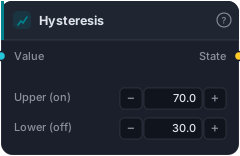
Two-threshold (Schmitt-trigger) gate: turns ON when the value rises above the upper threshold, OFF when it falls below the lower, and HOLDS in between. The deterministic anti-chatter fix for a single threshold that flickers on/off around one level. Starts OFF.
Hysteresis is a two-threshold (Schmitt-trigger) switch that cures the flicker you get from a single level. It turns ON when the value rises above an upper threshold and only turns OFF when it falls below a lower one — holding its state in the gap between. That dead-band stops a value hovering around one line from rapidly toggling on and off.
How it works
The block tracks a latched state, starting OFF. Each bar: if the input rises above upper, the state flips ON; if it drops below lower, it flips OFF; anywhere between the two thresholds it holds whatever it was. The result is a clean, deterministic on/off with no chatter — the anti-whipsaw fix a plain GreaterThan can't give you. Lookahead-free.
When to use it
Use it anywhere a single-threshold flag misbehaves near its level: an overbought/oversold gate that flickers when RSI sits at 70, a volatility on/off switch, a regime flag. Set upper and lower to bracket the noisy zone — the wider the gap, the more stable (but the slower to switch) the state.
Example
Stable trend regime: wire an ADX into Hysteresis with upper = 25, lower = 20. The "trending" state turns on once ADX clears 25 and stays on until it drops under 20 — so a strategy doesn't rapidly flip between trend and range logic while ADX wobbles around 22.
Tips & gotchas
- Starts OFF — it needs to clear
upperonce before it can turn on. uppermust sit abovelower— the gap between them is the anti-chatter dead-band.- Wider gap = more stability, slower to switch.
- Deterministic and stateful — the preferred fix over adding a Cooldown to a raw threshold when the problem is level-flicker.
Related blocks
Inputs
| Socket | Type | What to wire in |
|---|---|---|
| Value | series / bars |
Series to gate. BARS uses close. |
Outputs
| Output | Type | Plots as | Description |
|---|---|---|---|
| State | signal |
Signal arrows | Latched on/off state. |
Parameters
| Parameter | Type | Default | What it does |
|---|---|---|---|
| Upper (on) | number · -1000000.0–1000000.0 | 70.0 |
Turn ON when value rises above this. |
| Lower (off) | number · -1000000.0–1000000.0 | 30.0 |
Turn OFF when value falls below this. |
Reference auto-generated from the block catalog · category Signals.