Cooldown
Flow · Throttle
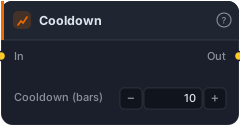
Allow the input signal to fire, then suppress it for N bars before allowing another fire. Prevents revenge entries — 'don't take another long for 20 bars after the last entry/stop-out'.
Cooldown throttles a signal: it lets one fire through, then suppresses every further fire for N bars before allowing the next. It's the antidote to over-trading and "revenge entries." Without it, a signal that keeps re-firing can pile you into entry after entry — right back into the same move that just stopped you out. Cooldown enforces a mandatory pause: "no new long for 20 bars after the last one."
How it works
When the input fires true, the block passes it through, then forces its output false for the next Cooldown (bars) bars (default 10) regardless of what the input does. After the cooldown elapses, the next input fire is allowed through and the timer restarts. Suppressed bars simply stay false. It's a one-input throttle with a single bar-count parameter.
When to use it
Use Cooldown to space out entries and stop a strategy from clustering trades. Classic cases: preventing re-entry straight after a stop-out (the revenge trade), avoiding multiple entries on the same swing when a condition flickers true repeatedly, and generally capping trade frequency to something sane. It pairs well with Pulse/Edge Trigger: edge-detect to fire once per setup, then Cooldown to ensure setups themselves are spaced apart. Tune the window to your timeframe — long enough to skip the immediate aftermath of a trade, short enough not to miss genuinely new setups.
Example
No revenge entries: take your entry signal (already edge-detected with Pulse) and pass it through Cooldown at 20 bars, so after any entry the strategy won't take another long for 20 bars — letting the dust settle after a stop-out. Route to a Tester and backtest the trade frequency in the Tester.
Tips & gotchas
- Stops revenge entries and clustering — the main reason to reach for it.
- Suppresses unconditionally for N bars after a fire — even valid signals in that window are dropped, by design.
- Pair with Pulse — edge-detect first, then space the edges apart.
- Match the window to your timeframe — long enough to matter, short enough not to skip real setups.
Related blocks
Inputs
| Socket | Type | What to wire in |
|---|---|---|
| In | signal |
Signal to throttle. |
Outputs
| Output | Type | Plots as | Description |
|---|---|---|---|
| Out | signal |
Signal arrows | Throttled signal — suppressed bars stay false. |
Parameters
| Parameter | Type | Default | What it does |
|---|---|---|---|
| Cooldown (bars) | number · 1–10000 | 10 |
Bars to suppress after the most recent fired bar. |
Reference auto-generated from the block catalog · category Flow.