Range Filter
Indicators · Trend
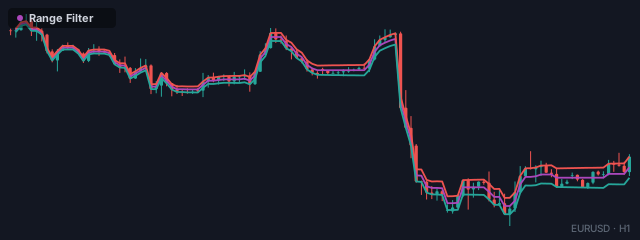
Range Filter — stair-steps the trend, ignoring sub-range noise.
The Range Filter (from Donovan Wall) is a trend line that deliberately ignores small moves. It only shifts when price travels more than a set range, so it stair-steps along — flat through the noise, then stepping up or down when a real move happens. The effect is a clean, decisive trend read that strips out the sub-range wiggle that whipsaws ordinary moving averages, with bull/bear signals on each turn.
How it works
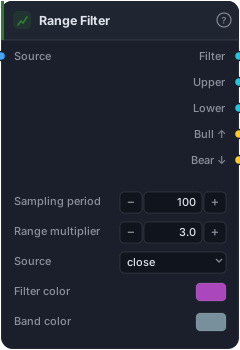
The block measures a smoothed average range over the Sampling period (default 100), scaled by the Range multiplier (default 3.0), to set a "deadband." The Filter line then only moves when the Source pushes beyond that band from the line's current level — otherwise it holds flat. Upper and Lower bands sit a range above and below the filter. When the filter turns up it fires Bull ↑; when it turns down, Bear ↓ (drawn as arrows). The bigger the multiplier, the wider the deadband and the more noise it ignores.
When to use it
Use the Range Filter as a noise-resistant trend and entry tool in markets that trend but are jittery. Because it stays flat through small moves, its turn signals are far less twitchy than a moving-average cross — fewer trades, cleaner direction. The trade-offs: it lags the start of a move (it waits for price to clear the band) and, like any trend tool, it chops if the market ranges wider than the deadband. Tune the multiplier so the deadband comfortably exceeds the typical noise of your instrument.
Example
A low-noise trend entry: wire bars into the Range Filter and route Bull ↑ into a Tester, using the Lower band as the Tester reference. Confirm the regime with ADX / DMI if your market sometimes ranges wider than the deadband. Backtest in the Tester and tune the multiplier to balance trade frequency against whipsaws.
Tips & gotchas
- The multiplier is the noise filter. Wider deadband = fewer, cleaner signals but more lag; tune it to your instrument's chop.
- Stair-steps by design. A flat filter means "no qualifying move" — that's the feature, not a bug.
- Lags the move's start — it confirms direction after price clears the band.
- Can still chop if the market ranges wider than the deadband; a trend gate helps.
Related blocks
Inputs
| Socket | Type | What to wire in |
|---|---|---|
| Source | bars / series |
Price bars or any indicator series |
Outputs
| Output | Type | Plots as | Description |
|---|---|---|---|
| Filter | series |
Line | Range filter line (price scale) |
| Upper | series |
Line | Filter + range band |
| Lower | series |
Line | Filter - range band |
| Bull ↑ | signal |
Signal arrows | Filter turns up |
| Bear ↓ | signal |
Signal arrows | Filter turns down |
Parameters
| Parameter | Type | Default | What it does |
|---|---|---|---|
| Sampling period | number · 2–500 | 100 |
|
| Range multiplier | number · 0.1–20.0 | 3.0 |
|
| Source | choice (close, open, high, low, hl2, hlc3, ohlc4) |
close |
|
| Filter color | colour | #ab47bc |
|
| Band color | colour | #78909c |
Reference auto-generated from the block catalog · category Indicators.