Linear Regression
Indicators · Statistical
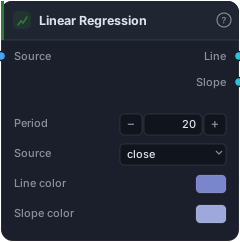
Rolling least-squares line — endpoint value and slope.
Linear Regression fits a straight "best-fit" line through the last N bars of price — the line a statistician would draw to summarise the recent trend — and gives you two things from it: the line's endpoint (where the trend "should" be right now) and its slope (how steep, and which way, the trend is leaning). It's a mathematically clean way to read trend direction and strength without the wobble of a moving average.
How it works
Over the Period (default 20) the block runs an ordinary least-squares fit on the Source values — the line that minimises the squared distance to every price in the window. The Line output is that regression line's value at the current bar (its endpoint), which behaves like a very smooth, lag-light trend line on the price pane. The Slope output is the line's gradient, plotted in a sub-pane: positive means the fitted trend rises, negative means it falls, and the magnitude tells you how strong the tilt is. Slope crossing zero marks where the fitted trend flips direction.
When to use it
Use the Line as a smooth trend baseline or the centre of a regression channel, and the Slope as a clean, continuous measure of trend direction and momentum — many traders prefer slope to a moving-average cross because it's less jumpy and gives an early read on a flattening trend. A rising-then-flattening slope warns that a trend is tiring before price actually turns.
Example
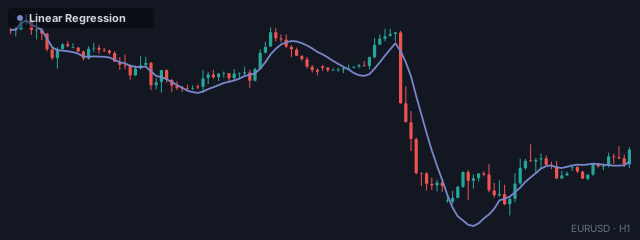
Trade with the fitted trend: wire bars into Linear Regression, require Slope to be above zero via a Greater Than against 0, and combine that with a pullback trigger through an And gate into a Tester — so you only buy when the statistical trend is genuinely up. Backtest in the Tester.
Tips & gotchas
- Slope is the gem. It's a smoother trend/momentum read than most oscillators — watch it flatten to anticipate turns.
- Endpoint, not the whole line. The Line output is the regression value at the current bar; it updates each bar as the window slides.
- Least-squares is sensitive to outliers — one freak bar tilts the fit; longer periods dilute that.
- Period sets the horizon. Short = local trend, long = structural trend.
Related blocks
Inputs
| Socket | Type | What to wire in |
|---|---|---|
| Source | bars / series |
Price bars or any indicator series |
Outputs
| Output | Type | Plots as | Description |
|---|---|---|---|
| Line | series |
Line | Endpoint of the rolling regression line |
| Slope | series |
Line · sub-pane | Slope of the line |
Parameters
| Parameter | Type | Default | What it does |
|---|---|---|---|
| Period | number · 2–500 | 20 |
|
| Source | choice (close, open, high, low, hl2, hlc3, ohlc4) |
close |
|
| Line color | colour | #7986cb |
|
| Slope color | colour | #9fa8da |
Reference auto-generated from the block catalog · category Indicators.