Bollinger Bands
Indicators · Bands & Channels
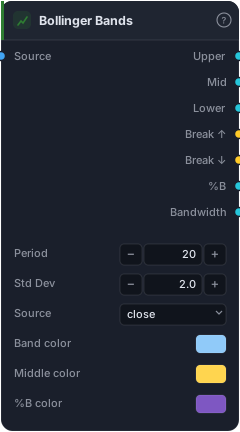
SMA of price ± N standard deviations.
Bollinger Bands wrap price in a volatility envelope: a moving-average spine with two bands that breathe in and out as the market gets calmer or wilder. When volatility drops the bands squeeze together; when it explodes they flare apart. That makes them two tools in one — a mean-reversion map (price tends to snap back from the outer bands) and a breakout radar (a squeeze often precedes a big move).
How it works
The Mid band is an SMA of the Source over Period bars (default 20). The Upper and Lower bands sit Std Dev standard deviations away (default 2.0) — so the bands' width is a live read of volatility. Statistically, ~2σ contains the large majority of recent closes, which is why touches of the outer band feel like stretches.
Beyond the three lines, the block hands you ready-made reads: Break ↑ / Break ↓ fire true when price closes beyond a band; %B tells you where price sits within the bands (0 = on the lower, 1 = on the upper, with overshoot past either end); and Bandwidth = (upper − lower) / middle, a clean numeric measure of the squeeze that you can threshold to detect compression. Each line has its own colour control.
When to use it
Use Bollinger Bands two ways. Mean reversion in ranges: fade touches of the outer band back toward the mid, ideally with an oscillator like RSI confirming the stretch. Breakout in trends: watch Bandwidth collapse to a multi-bar low (the squeeze), then trade the direction price breaks once the bands expand. The danger is mixing them up — fading a band in a strong trend ("walking the band") is how mean-reversion traders get run over.
Example
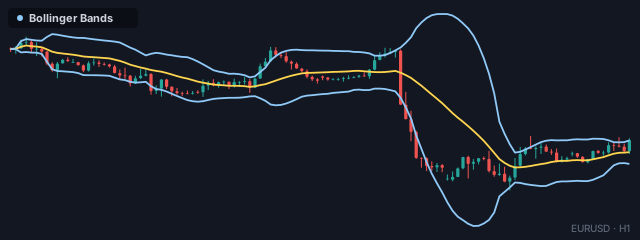
A squeeze-breakout setup: wire bars into Bollinger Bands and route Bandwidth into a Less Than block to detect compression (bandwidth below a small threshold). Combine that with the Break ↑ output via an And gate so you only fire when a breakout happens out of a squeeze, then send it to a Tester. Place the Tester just past the opposite band and backtest in the Tester.
Tips & gotchas
- Width is the signal, not just the lines. Most of the edge lives in Bandwidth (squeeze) and %B (location) — wire those, don't just eyeball the envelope.
- Don't fade a trend. In a strong move price "walks" the upper or lower band for bars on end; a band touch there is continuation, not reversal. Filter with ADX / DMI.
- 2σ is a default, not a rule. Wider bands (2.5–3σ) give rarer, cleaner stretches; tighter bands fire more often with more noise.
- The mid band is a real level. Price reverting to the 20-SMA mid is often the first target after a band stretch.
- Std Dev uses recent bars only — no lookahead — but the bands lag the start of a volatility change by design.
Related blocks
Inputs
| Socket | Type | What to wire in |
|---|---|---|
| Source | bars / series |
Price bars or any indicator series |
Outputs
| Output | Type | Plots as | Description |
|---|---|---|---|
| Upper | series |
Line | Upper band (mean + mult·σ) |
| Mid | series |
Line | Middle band (SMA of source) |
| Lower | series |
Line | Lower band (mean − mult·σ) |
| Break ↑ | signal |
— | True when source is above the upper band |
| Break ↓ | signal |
— | True when source is below the lower band |
| %B | series |
Line · sub-pane | (price − lower) / (upper − lower) — 0..1 with overshoot |
| Bandwidth | series |
Line · sub-pane | (upper − lower) / middle — relative band width |
Parameters
| Parameter | Type | Default | What it does |
|---|---|---|---|
| Period | number · 2–500 | 20 |
|
| Std Dev | number · 0.1–10.0 | 2.0 |
|
| Source | choice (close, open, high, low, hl2, hlc3, ohlc4) |
close |
|
| Band color | colour | #90caf9 |
|
| Middle color | colour | #ffd54f |
|
| %B color | colour | #7e57c2 |
|
| Bandwidth color | colour | #26c6da |
Reference auto-generated from the block catalog · category Indicators.