Clamp
Math · Arithmetic
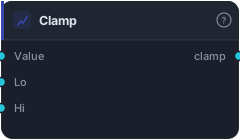
Bound a value between a lower and upper series: min(max(value, lo), hi). Values below lo snap up to lo, above hi snap down to hi. NaN in any input yields NaN.
Clamp keeps a value inside a range. Anything below the low bound snaps up to the low; anything above the high bound snaps down to the high; values already in range pass through untouched. It's the "don't let this go out of bounds" block for taming a level or a size.
How it works
Each bar it computes min(max(value, low), high) — first floor the value at low, then cap it at high. All three inputs are series, so the bounds can be constants or dynamic (e.g. an ATR-based ceiling). If any of the three inputs is NaN on a bar, the result is NaN. Lookahead-free, no parameters.
When to use it
Use it to bound anything that shouldn't run away: cap a computed stop distance so it never exceeds a max risk, floor a position-size multiplier so it never goes negative, or keep a derived score within sane limits before it drives a decision. It's a safety rail — the clean, deterministic alternative to hoping a value stays reasonable.
Example
Bounded stop distance: build a raw stop as ATR × 2 with Multiply, then Clamp it between a Constant floor and ceiling so the exported strategy never places an absurdly tight or absurdly wide stop. Feed the clamped value into the Tester's stop input.
Tips & gotchas
- Bounds can be series — wire dynamic floors/ceilings, not just constants.
- If low > high the result collapses to that crossed range — keep low ≤ high.
- NaN in any input → NaN out.
- To bound and remap a range instead of hard-snapping, use Rescale.
Related blocks
Inputs
| Socket | Type | What to wire in |
|---|---|---|
| Value | series / bars |
Series to bound. BARS uses close. |
| Lo (optional) | series / bars |
Lower bound. BARS uses close. Unwired, uses the value below. |
| Hi (optional) | series / bars |
Upper bound. BARS uses close. Unwired, uses the value below. |
Outputs
| Output | Type | Plots as | Description |
|---|---|---|---|
| clamp | series |
Line · sub-pane | Value constrained to [lo, hi]. |
Parameters
| Parameter | Type | Default | What it does |
|---|---|---|---|
| Lo | number · -1000000.0–1000000.0 | 0.0 |
Lower bound when the Lo socket is unwired. |
| Hi | number · -1000000.0–1000000.0 | 100.0 |
Upper bound when the Hi socket is unwired. |
Reference auto-generated from the block catalog · category Math.