Multiply
Math · Arithmetic
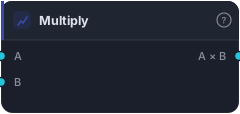
Multiply two series element-wise. Useful for scaling one series by another ('ATR × multiplier', 'volume × close').
Multiply takes two series and multiplies them element-wise — A times B. Its everyday job is scaling: stretching one series by another (or by a constant), which is exactly what you do when you build an ATR-based stop distance or weight a value by volume.
How it works
Each bar the block outputs A × B. Either input can be Bars (uses close) or a series; missing values give NaN.
When to use it
Use Multiply to scale a series. The most common case is ATR × multiplier to turn raw volatility into a stop or band distance — feed the result into a Tester-style leg or an Add to offset a line. It's also how you weight one series by another (volume × close for a crude money-flow term). For multiplying by a fixed number, Scalar Math is the lighter choice.
Example
A volatility stop distance: Multiply an ATR series (A) by a Constant of 2 (B) — or use Scalar Math — to get a 2-ATR distance, then wire it into the Tester's SL socket for a stop that scales with volatility. Backtest in the Tester.
Tips & gotchas
- Scaling is the main use — ATR×N stops, weighting one series by another.
- For a fixed multiplier, prefer Scalar Math.
- Either input can be bars or series — bars use close.
- Watch the result's units — multiplying two price-scale series rarely means anything sensible.
Related blocks
Inputs
| Socket | Type | What to wire in |
|---|---|---|
| A | series / bars |
First operand. BARS input uses close. |
| B | series / bars |
Second operand. BARS input uses close. |
Outputs
| Output | Type | Plots as | Description |
|---|---|---|---|
| A × B | series |
Line · sub-pane | Per-bar element-wise result. |
Reference auto-generated from the block catalog · category Math.