Scalar Math
Math · Arithmetic
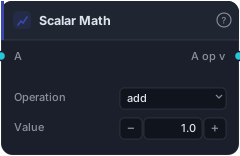
Combine a series with a fixed numeric value: add, subtract, multiply, or divide every bar by the same constant. Cheaper than Constant + BinaryOp when the second operand is genuinely fixed (offsets, unit conversions, scaling).
Scalar Math combines a series with a fixed number — add, subtract, multiply, or divide every bar by the same constant. It's the one-block shortcut for the very common case where the second operand isn't another series but just a value: an offset, a scale factor, a unit conversion.
How it works
Wire a series (or Bars, using close) into the single input, pick an Operation (add, subtract, multiply, divide), and set the Value constant. The block applies that operation with the constant to every bar. It's lighter and cleaner than wiring a Constant block into a two-input Add/Multiply — same result, one node instead of two.
When to use it
Use Scalar Math whenever the operand is genuinely fixed: scale an ATR by a multiplier (× 2), offset a line by a set amount (+ 10), convert units, or halve a value. It's the go-to for the "times a constant" and "plus a constant" operations that pepper strategy building. When the second operand is itself a series (another indicator), use the two-input arithmetic blocks instead.
Example
A 2-ATR stop distance in one block: wire an ATR series into Scalar Math, set Operation multiply and Value 2, and route the output into the Tester's SL socket. Cleaner than Constant + Multiply. Backtest in the Tester.
Tips & gotchas
- One node instead of Constant + an arithmetic block — use it whenever the operand is fixed.
- Four operations in one — add/subtract/multiply/divide via the dropdown.
- Divide by 0 in the Value yields NaN — avoid a zero divisor.
- For series-on-series, switch to Add/Subtract/Multiply/Divide.
Related blocks
Inputs
| Socket | Type | What to wire in |
|---|---|---|
| A | series / bars |
Operand. BARS input uses close. |
Outputs
| Output | Type | Plots as | Description |
|---|---|---|---|
| A op v | series |
Line · sub-pane | Per-bar element-wise result. |
Parameters
| Parameter | Type | Default | What it does |
|---|---|---|---|
| Operation | choice (add, subtract, multiply, divide) |
add |
|
| Value | number · -1000000.0–1000000.0 | 1.0 |
Constant applied per bar. |
Reference auto-generated from the block catalog · category Math.