Add
Math · Arithmetic
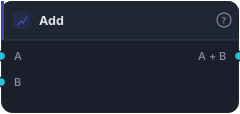
Add two series element-wise. Either input may be price BARS (uses close) or any SERIES. Useful for offsets and combining indicators ('EMA + ATR×N', 'high + buffer', etc.).
Add combines two series element-wise — bar by bar, A plus B. It's a basic arithmetic building block for constructing custom values: shifting a line up by a buffer, stacking one indicator onto another, building band edges by hand.
How it works
Each bar the block outputs A + B. Either input can be price Bars (which uses the close) or any series, so you can add an indicator to a price, two indicators together, or a series to a constant offset (wire a Constant into B). Where either input is missing, the result is NaN ("no value").
When to use it
Use Add to build values you can't get from a single block: EMA + ATR×N to draw a volatility-offset band, high + buffer for an entry level above structure, or to combine two component scores into one. It's most useful as plumbing between indicators and the risk/signal logic downstream. For adding a fixed number, Scalar Math is lighter than wiring a Constant.
Example
A manual upper band: take an EMA and an ATR×2 series (via Multiply) and Add them to draw a line two ATRs above the EMA — use it as a dynamic resistance reference or a Tester input. Backtest in the Tester.
Tips & gotchas
- Either input can be bars or series — bars use close.
- For a fixed offset, prefer Scalar Math over Constant + Add.
- Missing input → NaN — the engine reads that as no value.
- Mind units — adding two series only makes sense if they share a scale.
Related blocks
Inputs
| Socket | Type | What to wire in |
|---|---|---|
| A | series / bars |
First operand. BARS input uses close. |
| B | series / bars |
Second operand. BARS input uses close. |
Outputs
| Output | Type | Plots as | Description |
|---|---|---|---|
| A + B | series |
Line · sub-pane | Per-bar element-wise result. |
Reference auto-generated from the block catalog · category Math.