Rolling Range
Math · Rolling
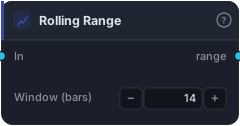
Spread between rolling max and rolling min — a simple proxy for volatility / regime expansion.
Rolling Range is the spread between the rolling max and rolling min over the trailing N bars — the height of the recent price envelope. It's a simple, intuitive volatility and regime gauge: a wide range means price has been covering a lot of ground (volatile, expanding), a narrow range means it's been coiled (quiet, compressing). A range squeezing to a multi-bar low is a classic pre-breakout tell.
How it works
Each bar the block outputs RollingMax − RollingMin of the source over the Window (bars) (default 14). Feed it Bars (uses close) or any series. The value is in the source's own units, so "wide" and "narrow" are judged relative to the instrument's own recent history.
When to use it
Use Rolling Range as a lightweight volatility/squeeze detector. Watch it contract toward a multi-bar low to anticipate a breakout (the calm before the move), or require it to be expanding before taking a breakout entry (confirming the move has room). It's a simpler cousin of ATR and Standard Deviation — less statistically refined, but immediate and easy to reason about. Feed it into a comparison to turn "range is narrow/wide" into a rule.
Example
A squeeze filter: compute the Rolling Range of price over 20 bars and require it below its own recent norm (a Less Than against a threshold) to detect compression; combine with a breakout trigger through an And gate so you only trade breakouts out of a squeeze. Backtest in the Tester.
Tips & gotchas
- Wide = volatile, narrow = coiled — a simple regime read.
- Contraction precedes breakouts — a multi-bar-low range is the squeeze tell.
- Absolute units — judge relative to the instrument's own history.
- Simpler than ATR/StdDev — less refined but immediate; use those for a more statistical measure.
Related blocks
Inputs
| Socket | Type | What to wire in |
|---|---|---|
| In | series / bars |
Source series. BARS input uses close. |
Outputs
| Output | Type | Plots as | Description |
|---|---|---|---|
| range | series |
Line · sub-pane | Rolling max − rolling min. |
Parameters
| Parameter | Type | Default | What it does |
|---|---|---|---|
| Window (bars) | number · 2–500 | 14 |
Bars in the rolling window. |
Reference auto-generated from the block catalog · category Math.