Squeeze Momentum
Indicators · Volatility
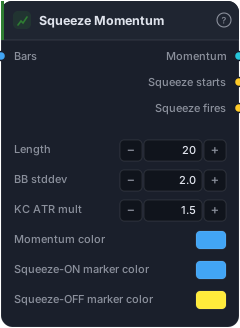
BB ⊂ KC compression flag + linreg momentum histogram.
Squeeze Momentum (popularised by LazyBear) combines two ideas into one elegant signal: it detects when the market is compressed — coiled up and about to move — and then shows you which direction the energy is building. The "squeeze" fires when volatility has been crushed to a point where a breakout becomes likely; the momentum histogram tells you whether to expect that breakout up or down. It's one of the most popular setups for trading volatility expansion.
How it works
The squeeze is defined by a relationship between two bands over the Length (default 20): Bollinger Bands at BB stddev (2.0) and Keltner Channels at KC ATR mult (1.5). When the Bollinger Bands contract inside the Keltner Channels, volatility is unusually low — the squeeze is on. The block emits a single-bar Squeeze starts event when compression begins (BB enters KC) and Squeeze fires when it releases (BB exits KC) — that release is the trade trigger. Meanwhile the Momentum histogram (a linear-regression of price relative to its midpoint) shows the building directional pressure: its colour and slope hint at which way price will break.
When to use it
The play is simple and powerful: wait in the squeeze, trade the release in the momentum's direction. While "squeeze on" persists, stand aside — the market is winding up. When "squeeze fires," enter in the direction the momentum histogram is pointing (and accelerating). It's a breakout/volatility-expansion tool, so it excels in markets that alternate between rest and thrust, and it gives you the rare combination of timing (the release) and direction (the histogram) in one block.
Example
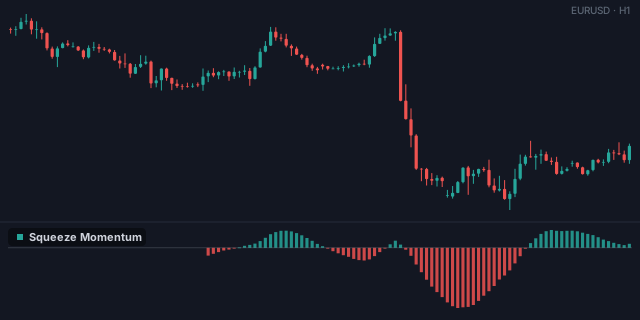
A textbook squeeze breakout: wire bars into Squeeze Momentum and route Squeeze fires into a Tester, gated by the Momentum histogram being positive (an And with a Greater Than against 0) so you only take upside releases. Place the Tester on the other side of the squeeze range and backtest in the Tester.
Tips & gotchas
- Two signals in one. Compression release = when; momentum histogram = which way. Use both.
- Wait for the fire. Entering during "squeeze on" is early — the release is the trigger.
- Momentum direction can flip on the breakout bar — confirm it's holding, not whipping.
- Built from Bollinger ⊂ Keltner — it's the formal version of the classic band-squeeze, with direction added.
Related blocks
Inputs
| Socket | Type | What to wire in |
|---|---|---|
| Bars | bars |
OHLC bars (high/low/close required) |
Outputs
| Output | Type | Plots as | Description |
|---|---|---|---|
| Momentum | series |
Histogram · sub-pane | Linreg(close − midpoint, length, offset=0) |
| Squeeze starts | signal |
Signal arrows | Single-bar event: compression has just begun (BB entered KC). |
| Squeeze fires | signal |
Signal arrows | Single-bar event: compression has just released (BB exited KC). |
Parameters
| Parameter | Type | Default | What it does |
|---|---|---|---|
| Length | number · 5–200 | 20 |
Lookback for BB + KC + momentum window |
| BB stddev | number · 0.5–10.0 | 2.0 |
Multiplier on stddev for the Bollinger Bands |
| KC ATR mult | number · 0.5–10.0 | 1.5 |
Multiplier on ATR for the Keltner Channel |
| Squeeze-ON marker color | colour | #42a5f5 |
|
| Squeeze-OFF marker color | colour | #ffeb3b |
|
| Histogram colors | choice (Green / Red, Blue / Orange, Teal / Magenta, Lime / Crimson, Mono) |
Green / Red |
Reference auto-generated from the block catalog · category Indicators.