Volatility Regime
Indicators · Proprietary
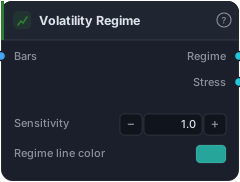
Classifies each bar into one of five volatility regimes: stable, compressing, normal, expanding, exhausting. Use as a context filter — most strategies have an optimal regime they want to trade in (mean-reversion likes stable, breakouts like expanding, etc.). Outputs a discrete state code 0–4 plus a continuous 0–1 stress score for soft filtering.
Volatility Regime is a context tool: it looks at how volatile the market is right now relative to its own recent behaviour and labels each bar with one of five states — stable, compressing, normal, expanding, or exhausting. The insight it encodes is that most strategies have a regime they're good in and regimes that quietly destroy them. Mean-reversion wants calm, stable conditions; breakouts want expansion; nobody wants to be caught fading an exhausting blow-off. This block lets you make "only trade in my regime" an explicit rule.
How it works
Under the hood the block compares the market's volatility across several time horizons — a fast read against slower baselines — and reads both the ratios between them and their direction to decide which of the five regimes each bar belongs to. The exact horizons and thresholds are part of the platform's calibration, but the resulting states behave intuitively:
- 0 — Stable: volatility is low and steady across horizons; the calm.
- 1 — Compressing: short-term volatility is dropping below the longer baseline; the coil before a move.
- 2 — Normal: the default; nothing notable.
- 3 — Expanding: short-term volatility is surging above the longer baseline; a move is underway.
- 4 — Exhausting: volatility was high but is now rolling over; the blow-off has likely peaked.
It exposes two outputs. Regime is the discrete code 0–4. Stress is a continuous 0–1 score of how far the current bar sits from "stable" — useful when the five-bucket label is too coarse and you want a smooth filter. The Sensitivity knob (default 1.0) controls how readily bars get pushed out of normal into the other states: higher catches more, lower is stricter. The defaults are calibrated on H1 forex, so other timeframes or instruments may want a nudge.
When to use it
Use it as a regime filter, not an entry. Wire the Regime (or Stress) output into a gate so your strategy only fires in the conditions it was built for: a breakout system that only triggers in expanding, a mean-reversion system that only triggers in stable, or a "stand aside in exhausting" safety rule. It won't tell you direction — it tells you whether the weather is right for your trade.
Example
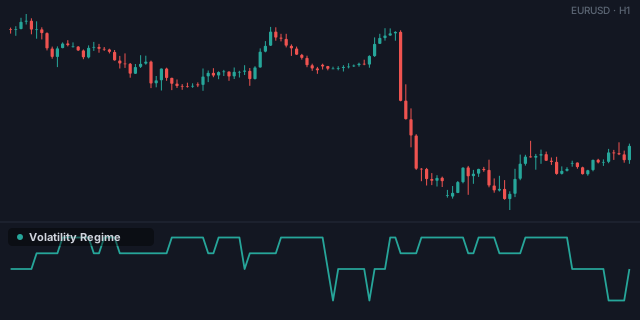
Gate a breakout to expansion: wire bars into Volatility Regime and require Regime to equal 3 (expanding) via an Equal check, combined with your breakout trigger through an And gate into a Tester. Compare the result against the ungated system in the Tester — the filter usually trims the low-quality trades taken in the wrong conditions.
Tips & gotchas
- It's a filter, full stop. It carries no directional bias — pair it with a signal that does.
- Match the regime to the strategy. Mean-reversion → stable; breakout → expanding; avoid trading into exhausting.
- Sensitivity is instrument-specific. Defaults suit H1 forex; raise it on quieter data, lower it on noisier.
- Use Stress for soft filtering when the five discrete buckets feel too blunt.
Related blocks
Inputs
| Socket | Type | What to wire in |
|---|---|---|
| Bars | bars |
Price bars |
Outputs
| Output | Type | Plots as | Description |
|---|---|---|---|
| Regime | series |
Line · sub-pane | Discrete regime: 0=stable, 1=compressing, 2=normal, 3=expanding, 4=exhausting |
| Stress | series |
Line · sub-pane | Continuous 0–1 deviation from the stable baseline |
Parameters
| Parameter | Type | Default | What it does |
|---|---|---|---|
| Sensitivity | number · 0.5–2.0 | 1.0 |
Higher = more bars classified as non-normal (expanding/compressing/exhausting); lower = stricter (more bars stay in normal). Tune per instrument. |
| Regime line color | colour | #26a69a |
Reference auto-generated from the block catalog · category Indicators.